
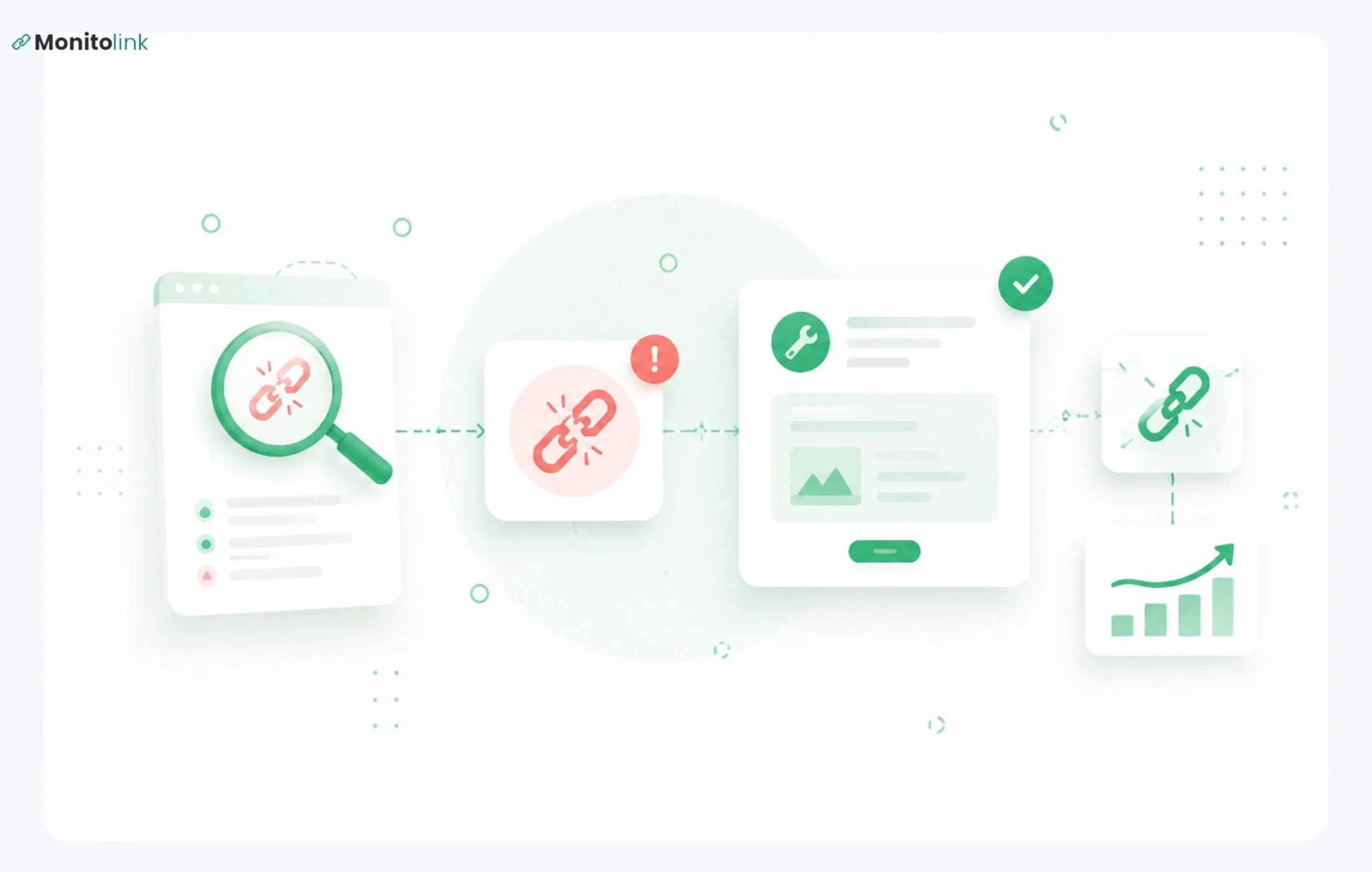
First, let’s define it - what are broken backlinks?
When another website links to one of your pages but that page no longer exists because it was deleted, moved, or its URL changed, the link breaks. Instead of reaching your content, visitors hit a 404 error. The other site did everything right; the problem is on your end.
With all that said, luckily, broken backlinks are one of the few SEO problems where the fix is simple once you know where to look. In this guide, I will show you exactly how to find broken backlinks and fix the ones worth fixing.
Broken Backlinks vs. Broken Internal Links
This distinction matters because the tools, the effort, and the fixes are completely different.
- Broken internal link - a link on your own site pointing to a dead page on your own site
- Broken external link - a link on your own site pointing to a dead page on someone else's site
- Broken backlink - a link on someone else's site pointing to a dead page on your site
This article is about the third one. Broken backlinks are an off-page issue - you don't control the linking site, and you can't edit their content. What you can control is whether your end of the equation resolves properly.
What Causes Broken Backlinks?
Before you can fix broken backlinks systematically, it helps to know why they break. The most common causes:
- A deleted page (product, campaign, or pruned content) turns any inbound links into dead ends.
- Any URL change without a redirect instantly breaks existing backlinks.
- Domain migrations risk mass backlink loss when old URLs aren't mapped to new ones.
- Typos in manually entered links from other sites can also cause breaks - fix them with a redirect or by contacting the site owner.
How Broken Backlinks Hurt Your Site
You Lose Link Equity
A broken backlink passes zero PageRank to your site. The linking domain did the work of earning that link and pointing it at you, but because your URL returns a 404, the equity evaporates. It doesn't flow to your homepage or anywhere else. It's just gone.
Restore or redirect that URL, and you recover it.
You Lose Referral Traffic
Users who follow a broken backlink from another site land on a 404 page and immediately leave. That's a real visitor, someone with enough intent to click through, who gets nothing from you. Depending on where the link is placed and what anchor text was used, that could represent meaningful bottom-of-funnel traffic.
It Signals Poor Site Maintenance
Google's John Mueller has called broken links a UX issue, not a direct ranking signal. A handful of 404s won't hurt you. But a pattern of unresolved broken pages, especially those that once had strong backlinks, signals to Google that your site isn't well maintained.
Gary Illyes offered a practical filter: fix the broken links that are helpful to users. That's the right lens, not chasing every lost link, but prioritising the ones that actually matter.
How to Find Broken Backlinks
Method 1: Backlink Analysis Tools (Thorough)
This is where you get the full picture.
We built Monitolink’s backlink monitoring tool specifically to automatically surface these issues, without requiring you to remember to run a manual audit.
The link reclamation feature monitors your backlink profile continuously and alerts you when a backlink breaks - so you're not finding out months later that a high-DR link has been pointing at a 404 the entire time.
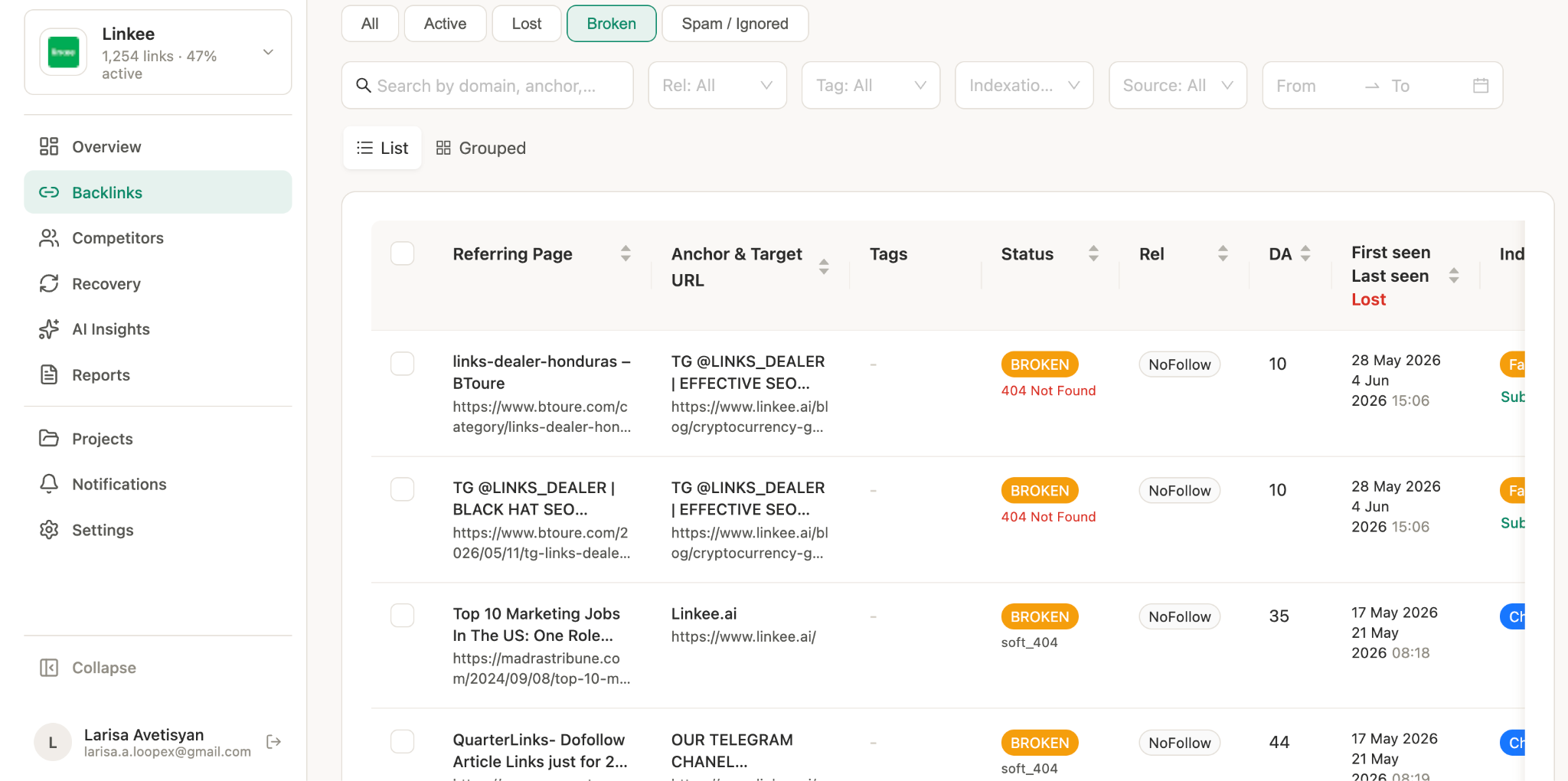
In our experience, the faster you catch a broken backlink, the more likely a simple redirect is all it takes to recover the equity. Waiting six months means the linking site may have already removed or replaced the link themselves.
Other tools you can use if you’re already paying for them:
- Ahrefs (Site Explorer > enter your domain > Backlinks > filter by Broken)
- Semrush (Backlink Analytics > Indexed Pages > filter by 4xx HTTP status)
- Moz (Link Explorer > Top Pages > filter by 4xx - Broken)
If you are not paying for these, opt for Monitolink as a more affordable but professional option. You can start a 14-day free trial to see what's currently broken in your backlink profile.
Method 2: Google Search Console (Free)
Google Search Console (GSC) shows you which missing pages Googlebot has actually tried to crawl - it won't catch everything, but it's free, reflects real crawl behaviour, and is the right place to start.
- Open Google Search Console and select your property
- Go to Indexing > Pages
- Under "Why pages aren't indexed," click Not found (404)
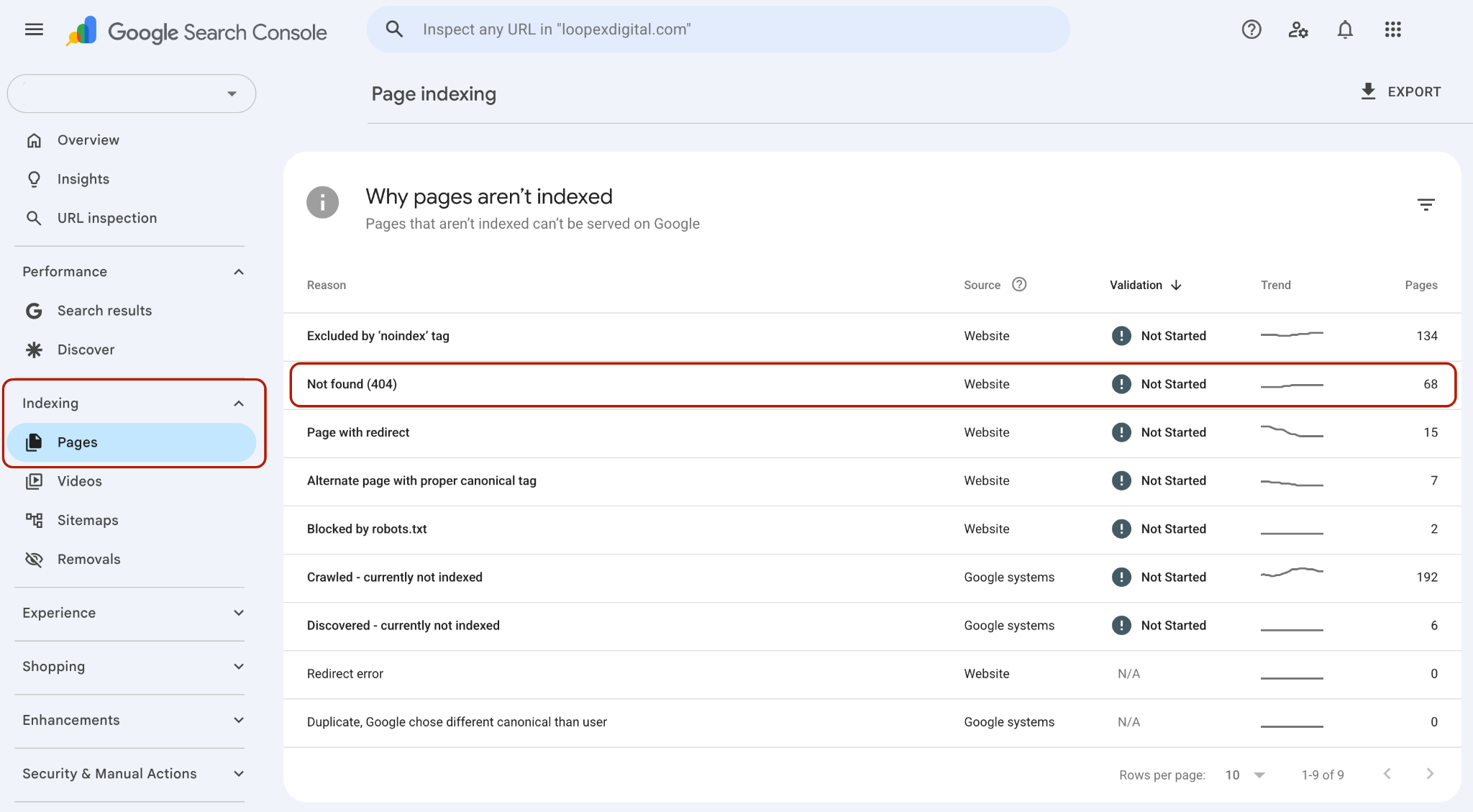
- You'll see a list of URLs returning 404s. Click any URL, then select Inspect URL to see referring pages - these are the pages on your site (or others) linking to the broken URL
- Once you've made fixes, return to this report and hit Validate Fix to prompt Google to recheck
Limitation: GSC only shows what Googlebot has crawled. Low-authority referring domains that Googlebot rarely visits won't appear here. For full coverage, use a backlink tool, like I explained in Method 1.
How to Fix Broken Backlinks
Your list is ready, and from here you have three options.
Option 1: Set Up a 301 Redirect (Fastest, Most Scalable)
Use this when you have a relevant live page that the broken URL should point to.
A 301 redirect permanently forwards the old URL to the new one and passes most of the original link equity along. This is the right move for most broken backlinks - it's quick, it scales, and you don't need to contact anyone.
The redirect needs to go to a topically relevant page. Redirecting everything to your homepage is lazy, and Google knows it - they'll treat it as a soft 404 if the destination has no clear relationship to the original URL.
Apache (.htaccess):
RewriteEngine On
RewriteRule ^old-page-url/?$ https://yourdomain.com/new-page-url [R=301,L]
Nginx:
location = /old-page-url {
return 301 https://yourdomain.com/new-page-url;
}
Most CMS platforms (WordPress, Webflow, etc.) have redirect managers that handle this without touching server config.
Option 2: Recreate the Page at the Original URL (Best for High-Value Pages)
Use this when the broken page had a strong backlink profile and the content is worth restoring.
The URL comes back to life, and the equity flows directly. It's more work, but if you have a page that attracted links from 10+ domains and you deleted it accidentally (or during a migration), recreating it pays off.
Option 3: Contact the Linking Site
If a high-authority site linked to you with a typo, or linked to a page you've since moved somewhere a redirect wouldn't make sense, it's worth emailing the webmaster directly.
Keep it brief - tell them the URL they have and the correct one it should point to.
If you’re using Monitolink, this step is fast and simple: You find the contacts of relevant pages in the Recovery tab with a simple click:

Then, you just send them an email from an already created and saved outreach template that’s being customised based on the contact data.
A few honest caveats from my experience:
- Response rates are low. Expect maybe 10-20% on a good outreach campaign.
- There's a real risk the owner decides to remove the link entirely rather than update it.
The success of this really depends on the outreach text. If you do go with this route, our link building outreach templates have battle-tested copy for exactly this scenario.
How to Prioritize Broken Backlinks for Recovery
If you have 150 broken backlinks, that doesn’t mean you should devote all your time and resources to recovering them. You should pick and choose the ones that will bring the most value (or currently have the most negative effect).
Fix immediately:
- Broken backlinks from domains with DR/DA 50+ (meaningful equity at stake)
- Pages where multiple referring domains are pointing to the same broken URL (compounded loss)
- Broken backlinks that historically sent referral traffic - check GA4 for 404 landing page sessions from referral sources
- Anchor text that's topically important for keywords you're actively trying to rank for
Fix when you have time:
- Mid-authority links (DR 20-50) to broken pages that still have relevance
- Links from niche-relevant sites even if their raw DR is lower
Deprioritize or ignore:
- Broken backlinks from clearly low-quality or spammy domains
- Links pointing to pages for discontinued products or outdated content - a 404 here is often the correct response
- Links from AI-generated, scraped, or spam pages with no real audience
Gary Illyes' framing is genuinely useful here: would a real user care about clicking that link? If the answer is no, the SEO value of fixing it is minimal too.
For a deeper look at how to evaluate your full backlink profile, including which links are working against you, our backlink profile audit guide covers this in detail.
The Ongoing Problem: Backlinks Break All the Time
Backlinks break continuously - every time you update a URL, run a site migration, delete old content, or a referring site copies your URL incorrectly. The sites linking to you don't notify you when their link breaks. You find out months later, if at all, when you happen to run a crawl.
This is why continuous backlink monitoring matters more than periodic audits. In practice, the window between a backlink breaking and it being fixed is where you lose the most equity, because if you catch it within a few days, a redirect is trivial.
For teams managing clients and managing client backlink reports, this also changes the reporting conversation. Instead of showing a client a static audit report, you're showing them live backlink health over time.
Bonus: Use This Same Process for Broken Link Building
Now that you understand how broken backlinks work, you can flip the approach and use it to acquire new links.
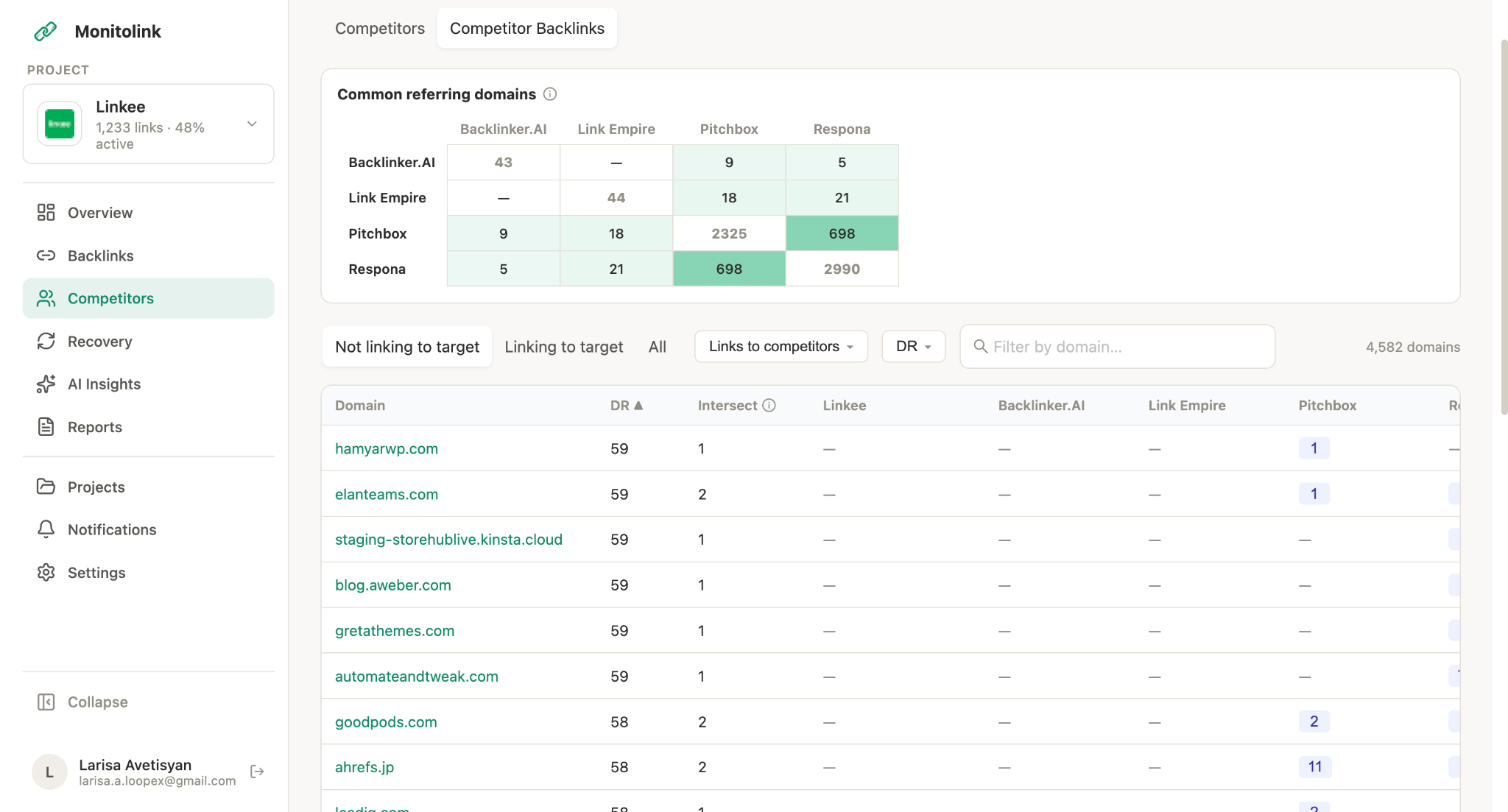
Find broken backlinks pointing to competitor pages - links from third-party sites to dead URLs on your competitors' domains. Then pitch the site owner your content as a replacement. They have a broken link they probably want to fix; you have relevant content that could replace it. It's a legitimate, white-hat tactic that genuinely helps the linking site.
You can use the same backlink tools above, including Monitolink, with a competitor's domain instead of your own. Our backlink gap analysis feature does this automatically, so you can see exactly which competitor URLs are broken and which referring domains might be receptive to your pitch.
Key Takeaway: Fix Broken Backlinks Before You Lose the Link
Run a broken backlink audit now using GSC and a backlink tool like Monitolink. Prioritize by referring domain authority and traffic impact. Fix the high-value ones with 301 redirects or page restoration. Set up monitoring so you don't have to repeat this audit from scratch every quarter.
Broken backlinks are one of the few SEO issues where the gap between "finding the problem" and "recovering the value" is genuinely small. The equity is sitting there, waiting - you just need a redirect or a restored page to reclaim it.