
Link building outreach may sound easy - you just get in touch with folks who run sites, blogs, or news pages and request they add a link to your stuff. Yet, lots of outreach attempts fall flat because the messages sent are too basic, target the incorrect person, neglect follow-ups, or simply miss out on links that were earned and don't use them.
Now,let’s together look at methods of link building outreach, message templates you can use right away, handy tools, and shows you how to keep tabs on the links you gather to make sure your efforts pay off.
Why is Link Building Outreach Non-Negotiable for SEO?
Backlinks remain one of Google's strongest ranking signals, but you can't rely on earning links passively, especially if you're in a competitive niche. Outreach puts you in control.
Done well, outreach link building gets you:
- High-authority backlinks that move rankings
- Referral traffic from relevant audiences
- Brand visibility in your industry
- Relationships that compound over time
Done badly, it burns bridges, gets your domain flagged for spam, and wastes hours for zero return.
Here's where the right approaches and email examples come in, and I'm happy to show you those now.
Top 5 Link Building Outreach Strategies (with Templates)
Let's zoom in on five key strategies - understanding their ins and outs helps boost your campaign success rate.
1. Broken Link Building Outreach
You spot a dead link on another site that leads to a 404 error or inactive page. You contact them, point out the faulty link, and suggest using your content instead. This is essentially assisting the site with a fix before even hinting at your ask.
When to use it: When you have content that genuinely replaces what the dead link was pointing to. Don't force this - if your content is only loosely related, your pitch will fall flat.
How to find broken link prospects (three options):
- Use Monitolink's competitor analysis to find broken link opportunities from competitor backlink profiles
- Use Ahrefs' Site Explorer → filter by broken outbound links in your niche
- Use Screaming Frog to crawl sites and surface 404s
Difficulty: Medium
2. Guest Post Outreach
You pitch a blog or publication the idea of writing an article for them. In return, you include a link back to your site within the content or author bio.
When to use it: When you want to build authority in a new niche, target a specific audience, or earn a link from a domain that doesn't link out freely.
How to find guest post prospects:
- Look at where competitors have published guest content using Monitolink and doing a full backlink profile audit
- Search Google for "write for us" + [your niche] or "guest author" + [your niche]
- Use Ahrefs Content Explorer → filter by "in title" for your topic → check the Authors column for multi-author sites (a signal they accept outside contributors)
Difficulty: Low to medium
3. Skyscraper Outreach
If you come across a popular piece of content with tons of backlinks, create a better version and contact all the sites linking to the old one, suggesting your improved page instead.
When to use it: This works great when your team has the resources to make something more current and just overall better.
How to find prospects:
- Cross-reference with competitor backlink data to find domains you haven't yet reached, using Monitolink (automatic)
- Enter a competitor's domain in Ahrefs → Indexed Pages → sort by referring domains → identify their most-linked content
Difficulty: Medium to high
4. Unlinked Mention Outreach
Someone has already mentioned your brand, content, or product - but didn't link to you. You reach out and ask them to add the link.
When to use it: This is the highest-converting link-building outreach type, full stop. The person already knows who you are. They already thought you were worth mentioning. You're just asking them to complete the action.
How to find prospects:
- Google Alerts for your brand name
- Ahrefs Content Explorer → search your brand name → filter for pages with no links to your domain
- Mention.com for real-time monitoring
Difficulty: Low
5. Lost Link Recovery Outreach
Links you've already earned get removed - pages are restructured, content is deleted, sites go offline. You reach out to recover what you lost.
When to use it: Always. This is the most underused form of link building outreach in SEO, and it has the best ROI because you're not starting from zero. You had the link. You just need it back.
Here's the catch: most folks don’t keep track of where their links end up. Even with tools like Ahrefs or Semrush, weekly site crawls aren't timely enough. By the time you discover a link is down - which could take seven days or more - the window to fix it is usually shut. This is where automation helps.
You need a tool like Monitolink’s backlink monitoring platform. It keeps tabs on your links around the clock and alerts you right away when any disappear, change, or vanish from search engines.
Then, from the Recovery tab, grabbing a contact’s email address and sending recovery emails is a one-click process straight from the dashboard.

You can have your recovery email templated already (Template 5 below).
How to find lost link prospects:
- Monitolink's Recovery tab: flags all lost and broken links automatically, filtered by status (lost = link removed, broken = 404 or server error), sortable by domain authority or campaign tag
- Or manually: run your domain through Ahrefs → Lost Backlinks report
For a full walkthrough of the recovery process, see our guide on how to recover lost backlinks.
Difficulty: Low (with the right tooling)
How to Write a Link Building Outreach Email That Gets Replies
Regardless of which strategy you're running, every outreach email has the same five components. Get these right, and your reply rate goes up. Get them wrong, and it doesn't matter how good your content is.
Subject line
Your subject line gets read in under two seconds. It needs to be specific, not clever.
What works:
- Reference the site name: Quick question about {source_domain}
- Reference the specific page: Your article on [topic] - related resource
- State the value plainly: Broken link on {source_domain} - I have a replacement
What doesn't work:
- "Quick question" (overused, signals nothing)
- "I love your content!" (immediate delete)
- "Link exchange request" (gets you spam-filtered)
I’d recommend keeping it under 50 characters. Don't put the ask in the subject line.
Opening
Use the recipient’s name ({contact_name}) always. If you can't find their name, "Hi there" beats "Hi Company X" every time.
Spend one sentence referencing something specific: a recent article, a stat they cited, a position they took. Something that proves you read their content.
Body
Keep it short, three to four sentences. Explain what you're pointing out or offering, and why it's relevant to them and their readers.
Reference specific details: the page URL ({source_url}), the anchor text ({anchor_text}), the domain ({source_domain}). The more specific you are, the more clearly it reads as a human-written email and not a template blast, even if it is a template.
Value proposition
Answer the question the recipient is silently asking: "why should I care?" Focus on what your content, fix, or collaboration does for them.
"Your readers will get a more current resource" is a value proposition, while "It would really help both our domain authorities" is not.
CTA
One ask. One! Make it easy to say yes with a low-friction action. "Would you be open to swapping the link?" is much better than asking if they’d consider adding a backlink to our website at earliest convenience.
7 Link Building Outreach Email Templates (Ready to Use)
Here are the templates for the strategy section put together for easy reference. The same variables - {contact_name}, {source_url}, {source_domain}, {domain_name}, {anchor_text} - will be used in all of them.
Once you've copied these into your email if you're using Monitolink for link building, you'll be set to go.
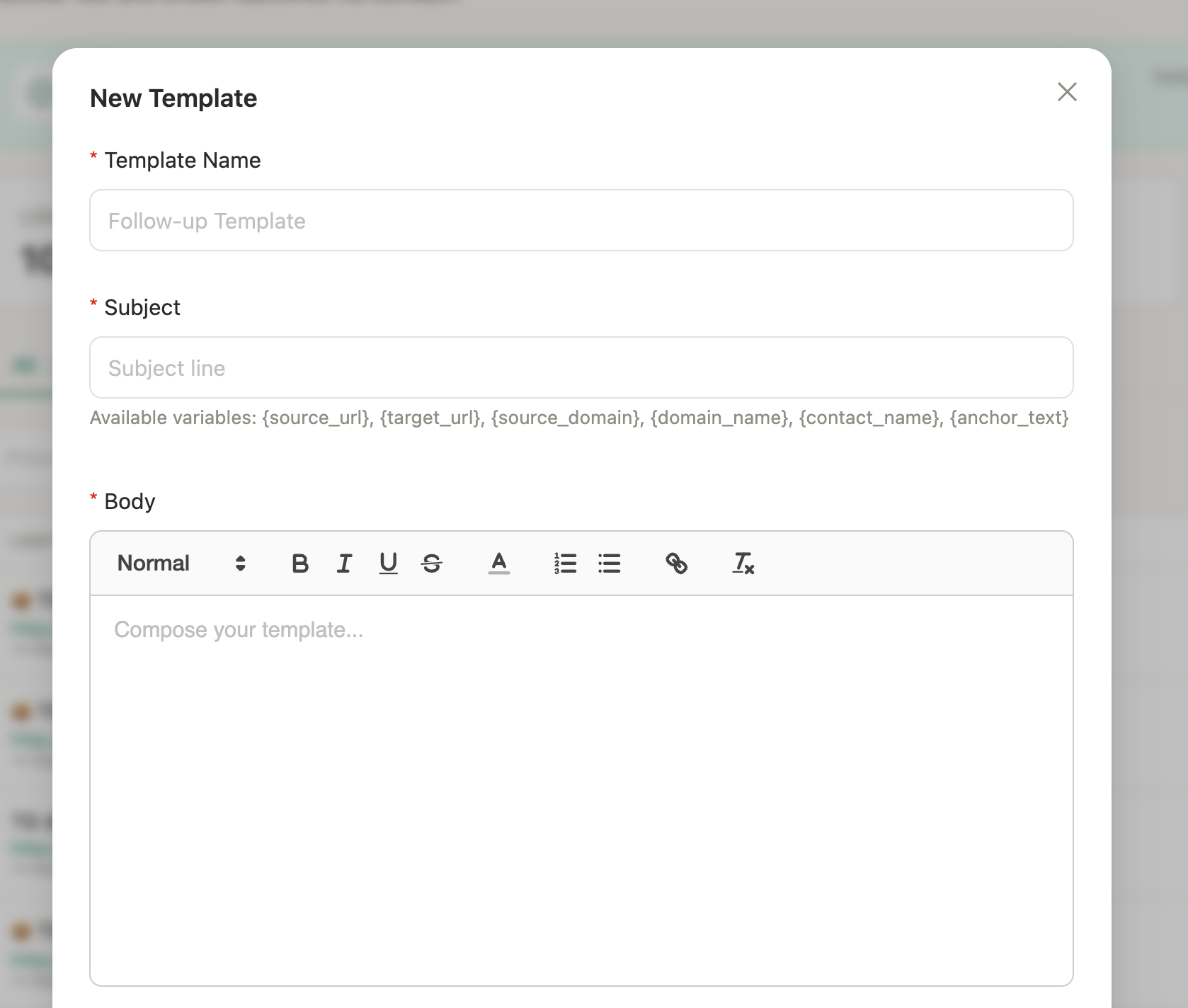
Without further ado, the templates:
Template 1 - Broken Link Replacement
Subject: Broken link on {source_domain} - quick fix
Hi {contact_name},
I was reading your article at {source_url} and noticed that one of the links returns a 404 - the one pointing to [dead URL].
I recently published a piece that covers the same topic: [your URL]. Might be a useful replacement if you're updating the page.
Either way, worth flagging.
[Your name]
Template 2 - Guest Post Pitch
Subject: Guest post idea for {domain_name}: [specific topic]
Hi {contact_name},
I've been following {domain_name} for a while - your piece on [specific article] stood out.
I write about [your area] and have a few ideas that would fit your audience:
- [Topic idea 1]
- [Topic idea 2]
- [Topic idea 3]
I can have a draft ready within the week and will match your existing format.
Worth exploring?
[Your name]
Template 3 - Skyscraper/Content Upgrade
Subject: Your link to [original piece] — updated resource available
Hi {contact_name},
I noticed you linked to [original article] from {source_url} using the anchor "{anchor_text}".
That piece is solid, but it was last updated in [year], and some of the data has changed. I published a more current version: [your URL] - it includes [specific improvements].
If you're ever updating that page, it might be worth a look.
[Your name]
Template 4 - Unlinked Mention
Subject: Quick request re: your mention on {source_domain}
Hi {contact_name},
I came across your article at {source_url} - thanks for the mention of [brand name].
Would you be open to linking that mention back to us? Here's the URL: [your URL]
Takes about 10 seconds and helps readers find us directly.
[Your name]
Template 5 - Lost Link Recovery
Subject: Link to {domain_name} from {source_url}
Hi {contact_name},
I noticed that a link to {domain_name} on {source_url} appears to have been removed recently.
If it was intentional, no problem. But if it happened during a site update or restructure, I'd love to get it restored - the page is still live: [your URL]
Happy to help if there's any context I'm missing.
[Your name]
Template 6 - Resource Page Inclusion
Subject: Resource suggestion for {source_domain}
Hi {contact_name},
I came across your resource page at {source_url} - it's a solid list for anyone getting started with [topic].
I recently published [your content title], which covers [specific angle not already on their list]. It might be a useful addition for your readers.
Here's the link: [your URL]
[Your name]
Template 7 - Follow-Up (Single)
Subject: Re: [original subject line]
Hi {contact_name},
Just following up on my note from [X] days ago - wanted to make sure it didn't get buried.
[One-sentence reminder of your original ask + your URL]
Happy to answer any questions if helpful.
[Your name]
Send one follow-up, 5-7 days after the original email. If there's no reply after two emails, move on. Sending a third chases people away and damages the relationship you might need later.
How to Find Outreach Prospects (by Strategy)
Finding the right contact is half the battle. Sending a great email to the wrong person is a waste of both your time and theirs.
Once you have a prospect list, finding their email is usually not hard. Each of these tools have some built-in capability to do it.
Always verify email addresses before sending - high bounce rates hurt deliverability for your whole domain.
Tools for Link Building Outreach
These are the tools worth knowing. I’ll simply tell yoy what each one does well, and who it's built for.
Final Thoughts on Link Building Outreach
To make outreach link building successful, treat it like business development. Find the correct person to approach, offer something genuinely valuable, keep things organized, and follow up just once.
Most attempts fail because the message goes to the wrong contact, uses a generic template, lacks a systematic follow-up process, or doesn't track the links earned.
So, if you want to see how monitoring and link building outreach fit into your existing workflow, Monitolink offers a free plan, no credit card required.
FAQ
What is the average response rate for link building outreach?
Now, regarding response rates in link building: industry standards show that cold outreach gets replies at a 1-5% rate. For warmer approaches, like unlinked mention fixes, recovering lost links, and contacting old connections, the rates improve to 10-20%. Personalized pitches that zero in on a specific benefit typically yield 15-17% results, backed by Ahrefs' own reports.
How do I find broken links for outreach?
Ahrefs' Site Explorer filtered by broken outbound links, Screaming Frog for crawling target sites, or Monitolink's competitor analysis for finding broken link opportunities in your niche. For broken links in your own profile, Monitolink's backlink dashboard flags them automatically.
What outreach tools do SEO agencies use?
Most agency workflows combine two or three of these rather than using one tool for everything:
- For backlink monitoring and recovery: Monitolink.
- For email discovery: Hunter.io.
- For high-volume automation: Pitchbox or Respona.
- For relationship management: BuzzStream.
How do I recover a lost backlink?
First, you need to know it's lost - which requires either weekly manual checks or a monitoring tool. Once you know, reach out to the site owner within 24-48 hours if possible. Use Template 5 from this guide. Assume good intent in your message.
For an automated version of this workflow, Monitolink's link reclamation feature handles monitoring, contact extraction, and outreach in a single dashboard.