
Your clients need to understand your backlink reports and develop trust towards you based on them. It can’t be something surface-level, and extra-deep as well.
As someone who’s done backlink reporting for clients weekly over 8 years, let me show you a working framework for it: metrics to include (or exclude), tools to make it easier, and even how to set reporting frequency based on where a client is in their SEO journey.
What a Client Backlink Report Needs to Do
Client reporting for backlinks specifically needs to answer three questions clearly:
- Is the link profile growing?
- Is it healthy?
- Is the work producing results?
Every metric you include should serve one of those three questions, otherwise keep it internal. Based on my experience, the fastest way to lose a client's attention is to bury the answers they care about under data they can't interpret.
The 6 Metrics that Belong in Every Client Backlink Report
1. Referring Domains (Not Total Backlinks)
Referring domains is the number of unique websites linking to your client's site, and you should include that. Total backlink count is almost always inflated by one site linking multiple times, and it tells you very little about profile strength.
When explaining this to a client: "We care about how many different websites are linking to you, not how many total links exist. One site linking to you 50 times counts less than 50 different sites linking once."
Total backlinks stay internal. Referring domain count and its month-over-month movement goes in the report.
2. New and Lost Links (With a Net Figure)
This is the most client-relevant metric in any backlink report because it shows momentum.
Don't present new and lost links as separate raw lists. Present a net figure first: if you earned 18 new referring domains and lost 4, the headline is +14 referring domains this month.
Below that, flag any lost links above a meaningful authority threshold (DR 40+ is a reasonable default for most niches) and what action you took - outreach attempt, redirect confirmed, or replacement link targeted.
If you want to go deeper on link recovery workflows, how to recover lost backlinks covers the full process.
Clients who see you catching and acting on lost links retain far longer than clients who only hear about wins.
3. Quality of New Links Earned
Knowing you gained 12 new backlinks last month isn’t enough. For example, a DR 75 link from a trusted industry publication isn't comparable to 12 DR 9 links from generic directories. Your clients need to grasp this difference.
When you write reports, focus on the top 3-5 links by authority. Mention the domain, describe the site in one sentence, and explain why it’s important.
4. Anchor Text Distribution (Simplified)
Clients do not need the full anchor text breakdown. What they need to know is whether the profile looks natural and whether there are any flags you're monitoring.
Show three numbers:
- branded anchors as a percentage,
- keyword anchors as a percentage, and
- generic/naked URL anchors as the remainder.
Most healthy sites should have about 40-50% branded, 20-30% keyword, and the rest generic or naked URLs.
With Monitorlink, for example, tracking these stats is easier; just check the dashboard and report what you find.
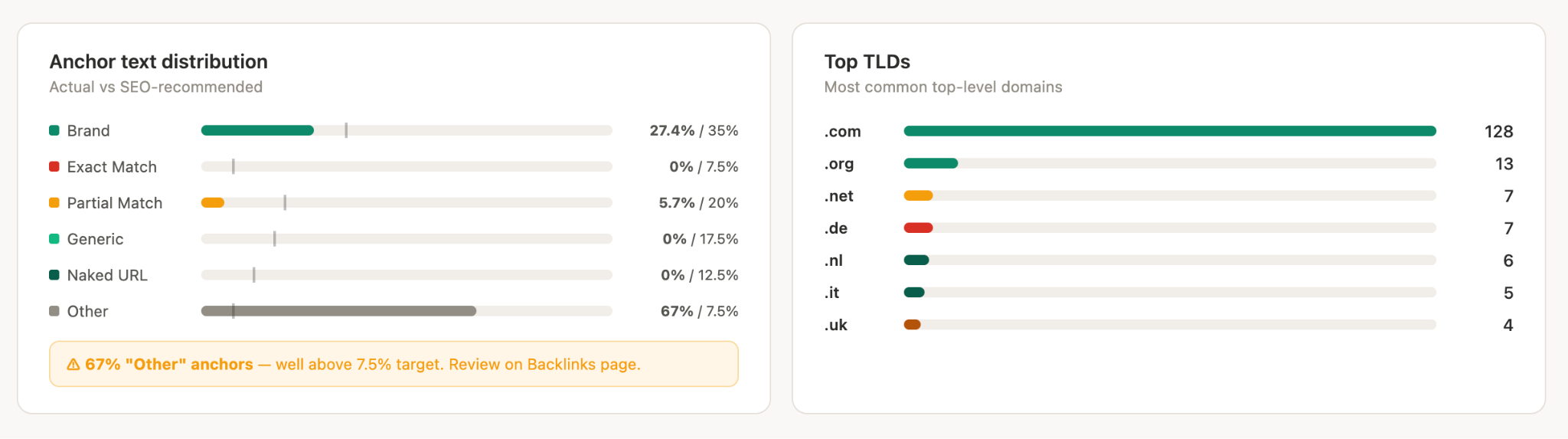
Comment only when something's out of the ordinary, such as an over-optimization risk, a sudden increase in exact-match anchors, or potential negative SEO.
If everything looks fine, one line is enough: "Anchor text distribution remains natural. No flags this period."
5. Link Velocity Trend (3-Month Rolling)
A single month of data is noisy. One slow month can look like a problem even when the overall trajectory is strong. Show a 3-month rolling chart of referring domain growth so clients see direction, not fluctuation.
This also protects you. If February is slow because you were focused on content production rather than outreach, the chart showing consistent growth across January-March tells the real story. Month-over-month snapshots invite short-term thinking. Trend charts invite the right conversation.
Again, if you’re using Monitolink, you can choose “Link Velocity” as report type, and have it presented for your required period.
6. Toxic or Flagged Links Actioned
Every report should include a one-line hygiene update on link risk, even when there's nothing to flag.
"No toxic or spammy links identified this period" is a sentence that takes five seconds to write and signals to the client that you're actively watching the profile.
If you did flag something, report what it was, what risk it posed, and what action you took: disavow file updated, removal request sent, or monitoring for further spread. Proactive transparency here is one of the clearest ways to differentiate a serious agency from one that only reports good news.
For a structured approach to keeping profiles clean on an ongoing basis, and I will introduce a tool for this later.
What to Leave Out of Client Reports
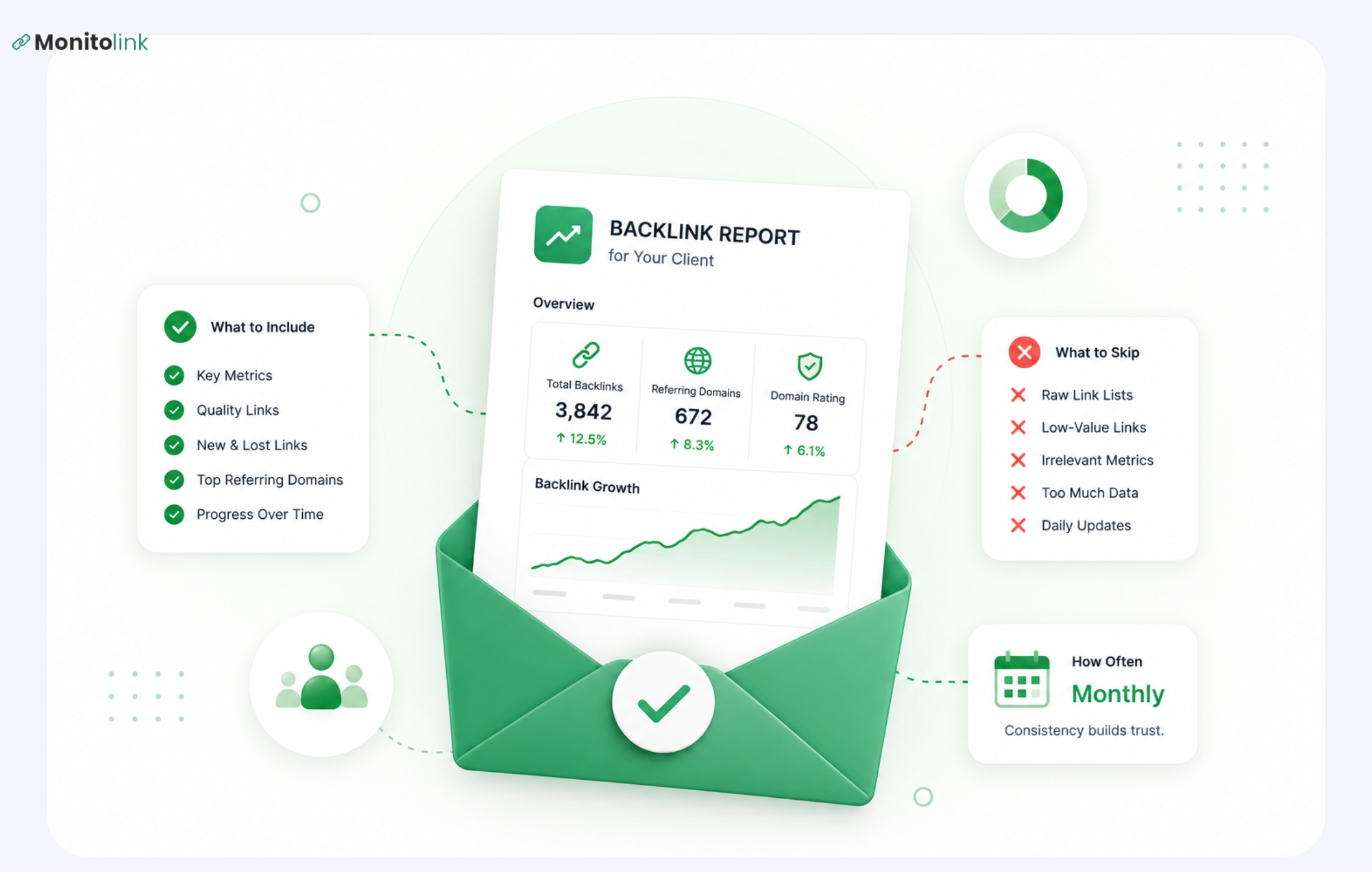
Including everything you track is one of the fastest ways to lose a client's attention. These five things belong in your workflow, but not your report:
- Raw backlink lists. Hundreds of URLs answer no meaningful question. If a client wants the export, attach it as an appendix.
- IP cluster analysis and PBN flags. Report the problem and the fix - not how you found it. Methodology stays internal.
- Competitor full backlink profiles. Valuable quarterly; distracting monthly. It shifts focus from the client's progress to their competitors' numbers, and generates more questions than the data is worth in that context.
- Nofollow link volume. Unless the ratio is severely skewed, it's noise. If it's a real problem, flag it - otherwise skip it.
- Small DR/Authority Score fluctuations. A drop from DR 61 to DR 58 isn't meaningful, but clients will ask. Track it internally and only surface significant drops or penalty signals.
How Often to Send Backlink Reports - By Client Type
Reporting frequency is one of the most consistent points of confusion in client reporting. Based on my experience with clients, here’s what I’d recommend doing:
Monthly - the default for active link building campaigns
If you're actively building links, monthly reporting shows the work and connects effort to movement. Your monthly report should cover new links earned and lost links actioned.
Monthly is the right default for most retainer clients in active campaign phases. It's frequent enough to demonstrate momentum without creating reporting overhead that eats into the time you should be spending on actual link building.
Quarterly - For Maintenance-Phase Clients
Once a client has a stable, healthy profile and you've moved from active building to monitoring and opportunistic acquisition, monthly reporting often produces thin reports that don't justify the preparation time. Quarterly works better here.
A quarterly report should be deeper: full anchor text review, a competitor backlink gap snapshot, 12-month trend data, and recommendations for the next period. This is also the right cadence for including competitor backlink analysis - showing where the client's profile stands relative to the sites they're competing with.
Weekly - Only in Specific Situations
Weekly backlink reporting is almost always too frequent, and it usually creates more client anxiety than clarity. Reserve it for two situations only: the first 60-90 days after recovering from a Google penalty, or immediately following a domain migration where link signals need close, active monitoring. Outside of these windows, weekly reporting generates noise rather than signal.
At Onboarding - The Baseline Audit
Before any recurring report goes out, every new client needs a baseline audit. This is the one time you show the full picture: complete profile health, toxicity check, anchor text distribution, referring domain breakdown, and a competitor gap overview.
Without this, you have no benchmark, and neither does the client. A thorough backlink profile audit at onboarding also surfaces any legacy issues, before they become your problem to explain.
Internal Tracking vs. Client-Facing Reporting: Where to Draw the Line
Internal tracking is really deep and detailed. Client reports show outcomes.
A simple test for you to draw the line is this: if a client needs to understand how a metric works before they can interpret it, keep it internal. If they can read it and immediately know whether it's good, neutral, or concerning, it belongs in the report.
Backlink Tracking Methods: How to Structure Your Monitoring Workflow To Help Reporting
The report is only as strong as the tracking and data feeding it, and manual data pulls are both time-consuming and unreliable at scale. So, let me share a few methods.
Method 1: Automated monitoring for real-time alerts.
Monthly reporting cycles mean a link could disappear and stay undetected for weeks. Real-time backlink monitoring closes that gap, so even if you report monthly, you always have a real time tracking to refer to.
Monitolink's backlink monitoring tool monitors link status continuously and sends alerts when a valuable link is lost or a new toxic signal appears, which means your monthly report reflects actions already taken, not problems just discovered.
You can do the link reclamation directly from the tool, with customized templates of outreach text, and verified contacts that the tools finds.
And when it’s all done, and it’s time to report you have a choice for 5 reporting types or a full audit report that combines all 5:
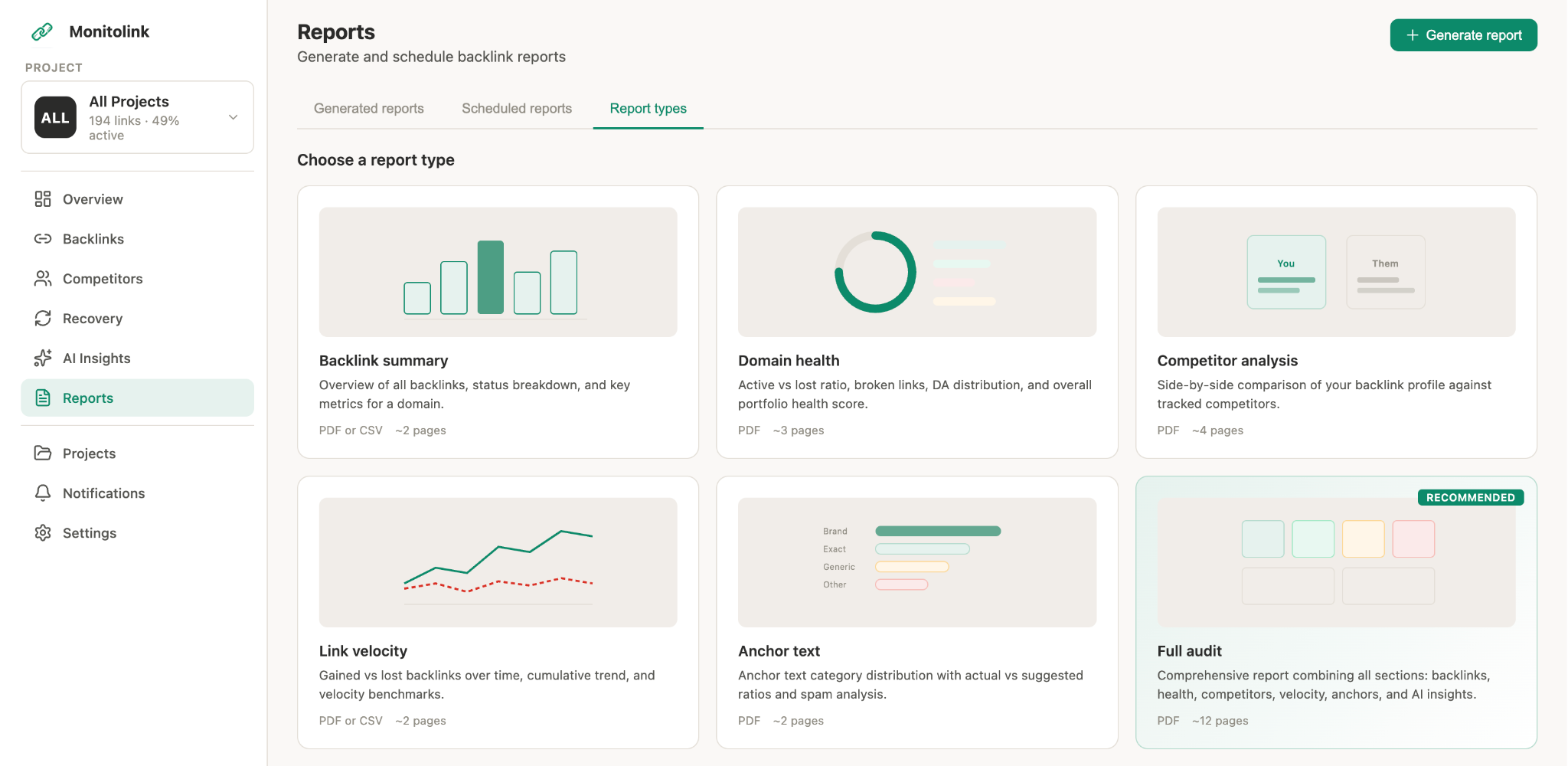
I love two things about this:
One, the report is fully custom, with the name and logo of your client company, and includes what you choose for it to include: backlinks, velocity, anchors, etc.
Two, you generate it in just 1 minute, by choosing the type, format, domain and name.
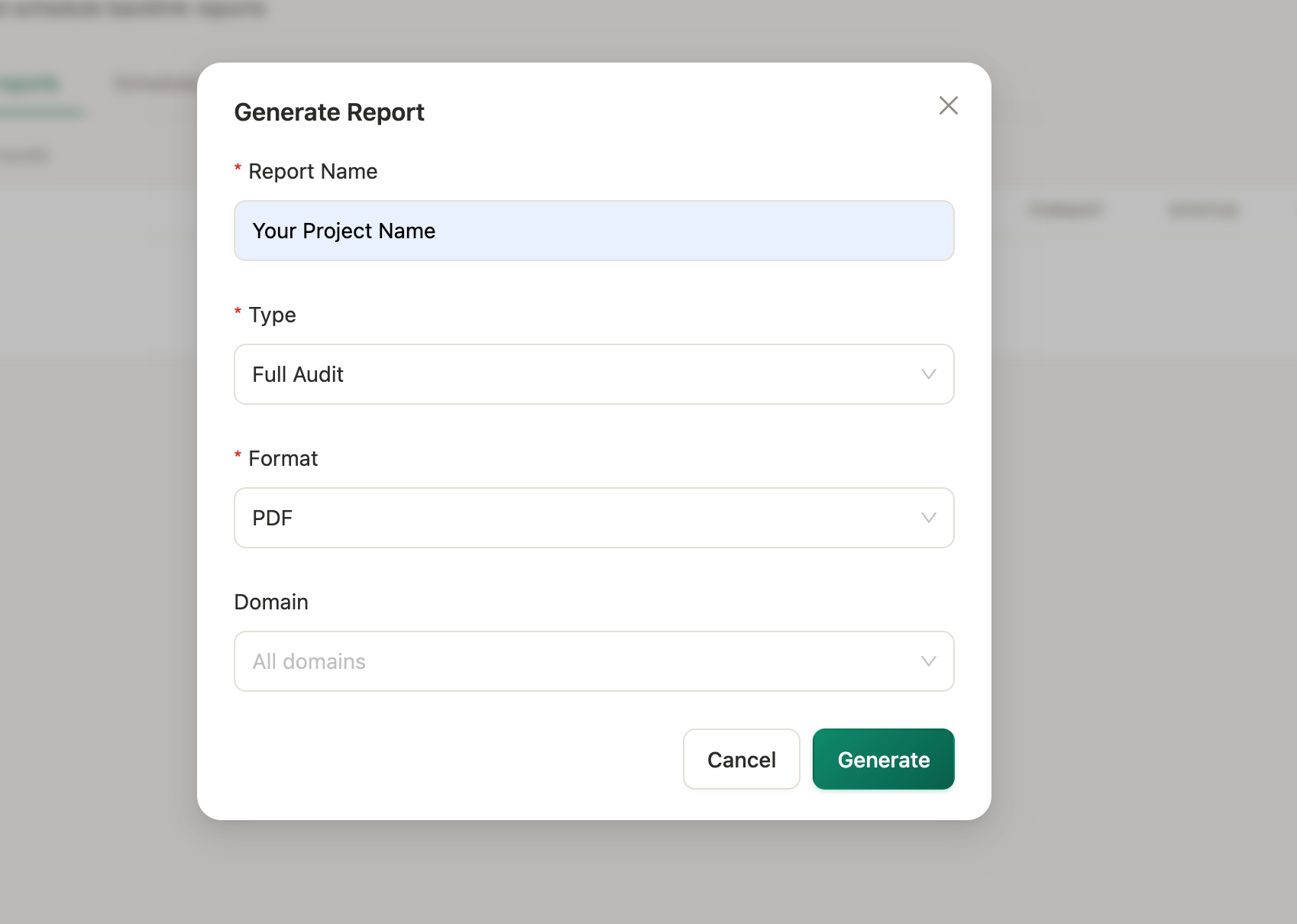
This seriously saves so much time, that client backlink reporting doesn’t feel like a task anymore. You can even schedule periodical reports to be automatically created.
Method 2: Primary Tool + GSC Cross-Check + Reporting Tool
For most agencies, one primary tool (Ahrefs or Semrush) paired with Google Search Console gives you sufficient coverage. The primary tool catches new and lost links, toxic signals, and anchor distribution. GSC confirms what Google itself is seeing. Where the two datasets diverge, investigate - discrepancies often surface links being ignored algorithmically or indexation issues worth knowing about.
Later, these agencies will use Google Looker Studio or similar reporting tools to gather the data and present it to the client.
Method 3: Sheets-Based Tracking for Early-Stage Clients
For clients on limited budgets who can't justify a full tool stack, a structured Google Sheet updated monthly is still workable. Track referring domain count, new and lost links manually flagged from GSC, top new links by authority, and a notes column for actions taken. It's labour-intensive, but the reporting framework is identical; the inputs just take longer to gather.
How to Explain Backlink Data to Clients Who Don't Know SEO
The "votes" analogy has been used so many times that most clients have heard it and tuned it out (if you don’t know it, good for you). Here are three framings that are tested enough to be trusted.
Use a press coverage analogy for link quality.
A mention in a major industry publication is worth far more than 50 mentions in generic directories - just like a front-page article in a trade journal matters more than a name-drop in a free local listings site. Clients in any industry immediately understand this, because they already think about PR in these terms.
Frame lost links as active housekeeping (definately not failure).
When a valuable link disappears, the story is not "we lost a link." The story is "we identified a lost link, assessed its value, and sent a reclamation request within 48 hours." The loss is the context. The action is the headline. This framing is only possible if your monitoring is tight enough to catch losses quickly, which is exactly why real-time monitoring matters for client reporting.
Connect link movement to ranking movement whenever you can make the case directly.
"We earned 9 new referring domains this month, including two from high-authority publications in your sector. The target page moved from position 11 to position 7 during the same period" is a report that a client understands, values, and shares internally. You don't need to do this for every metric, but one clear cause-and-effect narrative per report does more to justify your retainer than any amount of data.
Final Backlink Reporting Checklist
Frequently Asked Questions
What's the difference between backlink monitoring and backlink reporting?
Backlink monitoring is continuous - it tracks every change to a link profile in real time, catches losses as they happen, flags toxic signals, and feeds your internal workflow.
Backlink reporting is periodic - it summarises the outcomes of that monitoring into a client-facing document that tells the story of the period.
How do I explain referring domains to a client?
Tell them you care about how many different websites link to them, not how many total links exist. One website linking to them 100 times is far less valuable than 100 different websites linking once. Referring domains is the count that reflects the breadth of their profile and correlates most directly with ranking strength.
Should I include competitor backlinks in a monthly client report?
No, don't include competitor backlinks in monthly reports. They belong in the quarterly strategy sessions instead. Adding them monthly just causes extra hassle, generates distracting questions, and teaches clients to track progress based on a moving target, not their own progression.
What backlink metrics affect rankings?
To rank well, focus on metrics like the number of referring domains, the authority and topic relevancy of those sites, and your anchor text distribution. Track link building over time too. But for client updates, stick to stronger signals. Other stuff, like total backlink counts and changes in authority scores on existing links, is less important and better left for internal checks.