
Backlink management for agencies comes down to tracking the same data (links, statuses, anchors, DR) across multiple clients and campaigns all at once. Most tracking setups aren't built to cleanly segment that data, so you run into a problem.
Below, I’ll show you how to organize links by client and campaign with a simple three-level hierarchy (Client > Campaign > Target URL), track them in a standardized schema with consistent status stages, and then layer monitoring and reporting on top of that structure.
Why the Backlink Tracking Spreadsheet Breaks Down at Scale
Every agency starts with a spreadsheet. It's free, familiar, and works fine for one client. The trouble starts around client three or four and it's rarely the software's fault. It's what spreadsheets can't do on their own.
No live status. A cell that says "Live" was only true the day someone typed it. Nothing checks itself - someone has to manually revisit every URL to confirm it's still there, still dofollow, still pointing where it should. Across 40 clients, that's a full-time job nobody has. Links quietly go nofollow or die, and no one notices for weeks.
No clean segmentation. One tab per client works until a client runs three campaigns at once, or you need "all Q3 links across all clients" for a report. Spreadsheets aren't relational - filtering across client and campaign at the same time means duplicating data or building pivot tables that break the moment someone adds a column.
No safe sharing. Either the client gets edit access to your master sheet (risky), or you maintain a separate client-facing copy (double the work, guaranteed to drift out of sync).
No scaling with team size. Multiple people editing the same sheet means overwritten data, "who changed this row" confusion, and no audit trail.
None of this makes spreadsheets useless - they're fine for one client or a small campaign. The failure mode is running multiple clients on a system built for one.
The Client > Campaign > Target URL Hierarchy
This is how to organize backlinks by client: stop thinking about links as one flat list and start thinking about them in three nested levels.
Level 1: Client
Every client gets a dedicated workspace - a folder, a project, or a tag namespace, depending on your tooling. This houses every domain you manage for them, team permissions (who on your team can see or edit this client's data), and historical link performance going back to day one. Nothing from Client A should ever be visible inside Client B's view, even accidentally.
Level 2: Campaign
Inside each client workspace, tag every prospect and acquired link with a specific campaign identifier. This is where backlink campaign tracking happens - without campaign-level tags, you can see that a client gained 40 links this quarter, but you can't tell whether that came from your Q3 digital PR push, an ongoing niche-edit program, or a one-off product launch. Campaign tags let you isolate performance per initiative, which matters enormously when a client asks "was the PR campaign worth it?" and you need a real answer.
Example tags: Q3-DigitalPR, NicheEdits-Ongoing, ProductLaunch-Fall26.
Level 3: Target URL
Every individual backlink ties back to the specific client landing page or asset it's meant to support. This sounds obvious, but it's the level most trackers skip - they log the linking domain and forget to map it to the target. Without this, you can't answer "which pages got the link equity from this campaign," which is the number one thing a client wants to know when rankings move.
Putting it together: a single link record for Client X, tagged under their Q3-DigitalPR campaign, pointing to their /pricing page - that's the full context you need to filter, report, or audit that link at any point later, without digging through a separate document to figure out which campaign it belonged to.
The Standardized Backlink Tracking Schema
Whatever tool or sheet you use, every link record needs the same core fields. This is what makes backlink tracking for multiple clients consistent instead of ad hoc - new team members and new clients slot into the same structure instead of everyone building their own version.
Nine or ten columns feels like overkill for one client and one link. It doesn't feel like overkill on month six with 400 links across eight clients - that's when the missing fields cost you time, usually while a client is asking a question you can't answer without manually checking the URL.
Workflow Status Stages: A Shared Pipeline Language
Use the same status labels across every client and every team member. Mixed terminology - one person writes "sent," another writes "pitched," a third writes "outreach done" - makes filtering and reporting unreliable, because a report pulling "Pitch Sent" status won't catch the rows labeled something else.
A simple, four-stage pipeline covers almost every agency workflow:
- Prospecting - target identified, not yet contacted
- Pitch Sent - outreach has gone out, awaiting response
- Live - link is confirmed placed and indexed
- Lost / Broken - link was live and is now gone, nofollow, or 404
Keep it to these four unless you have a specific reason to add more. Every extra status is another thing your team has to remember to apply consistently, and inconsistent tagging is worse than no tagging at all.
Backlink Naming Conventions and Tagging System
A tagging system only works if everyone follows the same rules. Write them down once, put them somewhere your whole team can reference, and don't let them drift per-client.
Client and campaign naming: Pick one format and stick to it - ClientName_CampaignID_Quarter (e.g., AcmeCo_DigitalPR_Q3) is easy to sort, filter, and search. Avoid client nicknames or shorthand that only one person understands.
Anchor text discipline: This is where a lot of link profiles get quietly damaged. Don't reuse the same exact-match anchor more than once or twice per target page - over-optimized anchor text is one of the more reliable signals search engines flag as manipulative. Track anchor text per link in your schema so you can see the distribution at a glance instead of guessing. We've written a full breakdown of this in our anchor text optimization guide if you want the deeper mechanics.
Status labels: Use the four-stage pipeline above, exactly as written, across every client record. No synonyms, no shorthand variants.
Campaign tags: One tag per initiative, applied at the moment a prospect enters your pipeline. Retroactive tagging is where campaign data gets messy, because it depends on someone remembering which links belonged to which push months later.
Link Quality Checks That Belong in the Workflow
Organization only matters if what you're organizing is good. Before a link moves to "Live" status in your tracker, it should clear a few basic quality checks:
- Domain relevance - a link from a site in your client's niche carries more weight than a higher-DR link from an unrelated industry.
- Spam score - anything in the high range deserves a second look before you count it toward campaign targets. A high score alone isn't automatically disqualifying, but it's a flag worth reviewing.
- Indexation - a link that isn't indexed by search engines isn't passing equity, no matter how good the domain looks.
- Dofollow/nofollow balance - a healthy link profile has both. There's no universally agreed "correct" ratio, but a profile that's 100% dofollow can itself look unnatural.
- Referral traffic - the most direct performance signal you have. If you want to go deeper on evaluating link quality before you count it, our backlink profile audit guide walks through the full checklist.
Build these checks into the "Prospecting > Live" transition in your pipeline.
Automated Backlink Monitoring and Management
Even a perfectly structured tracker is only as good as its most recent manual check, and manual checks don't scale past a handful of clients.
What needs to be automated:
- Link status changes - dofollow flipping to nofollow, or a link disappearing entirely
- 404s and broken destinations - either on the linking page or your client's target URL
- Deindexation - a link that's technically still there but no longer passing value because the page dropped out of the index
At Monitolink, these problems are solved and you get an automated backlink management platform for agencies.
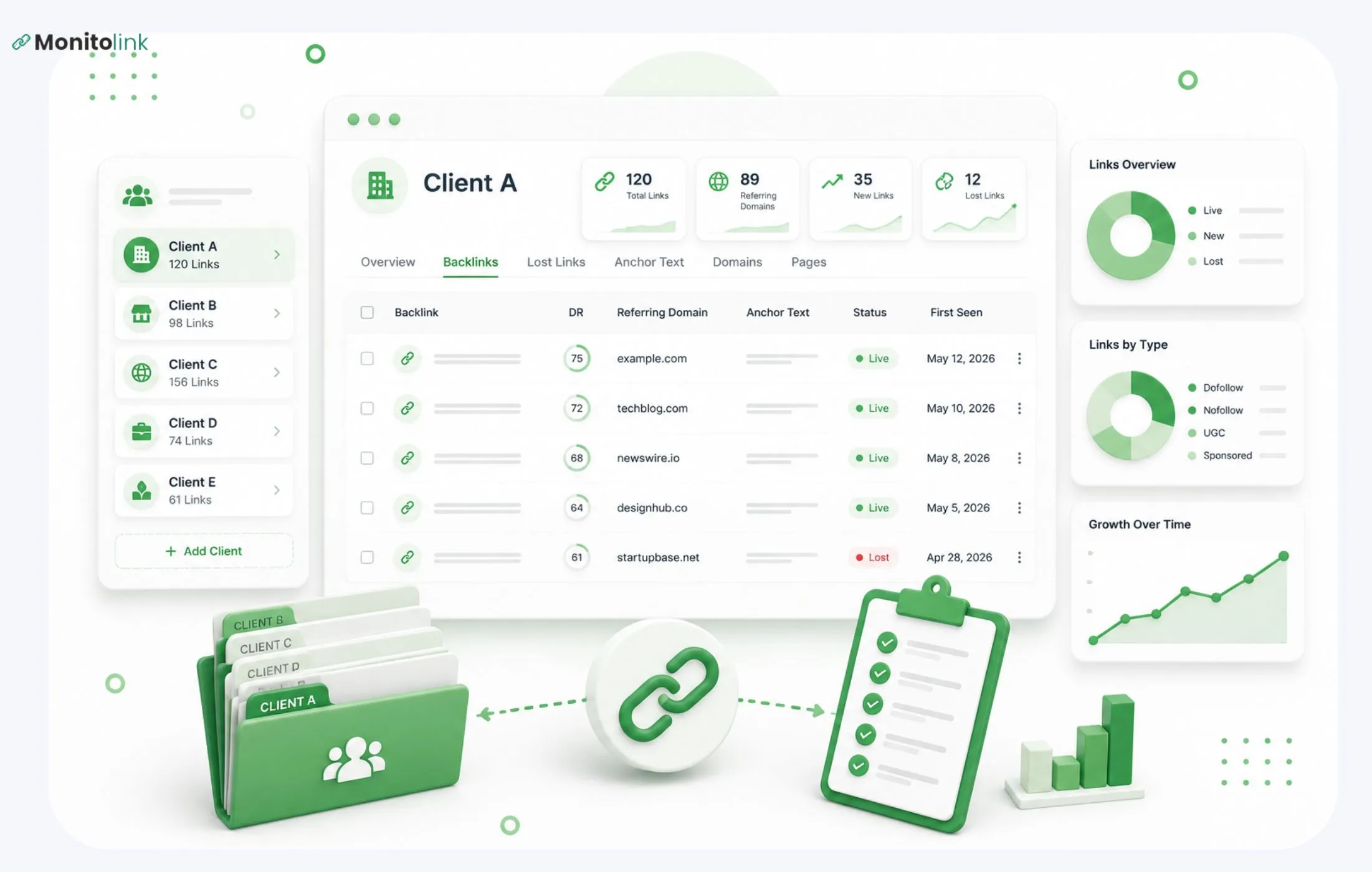
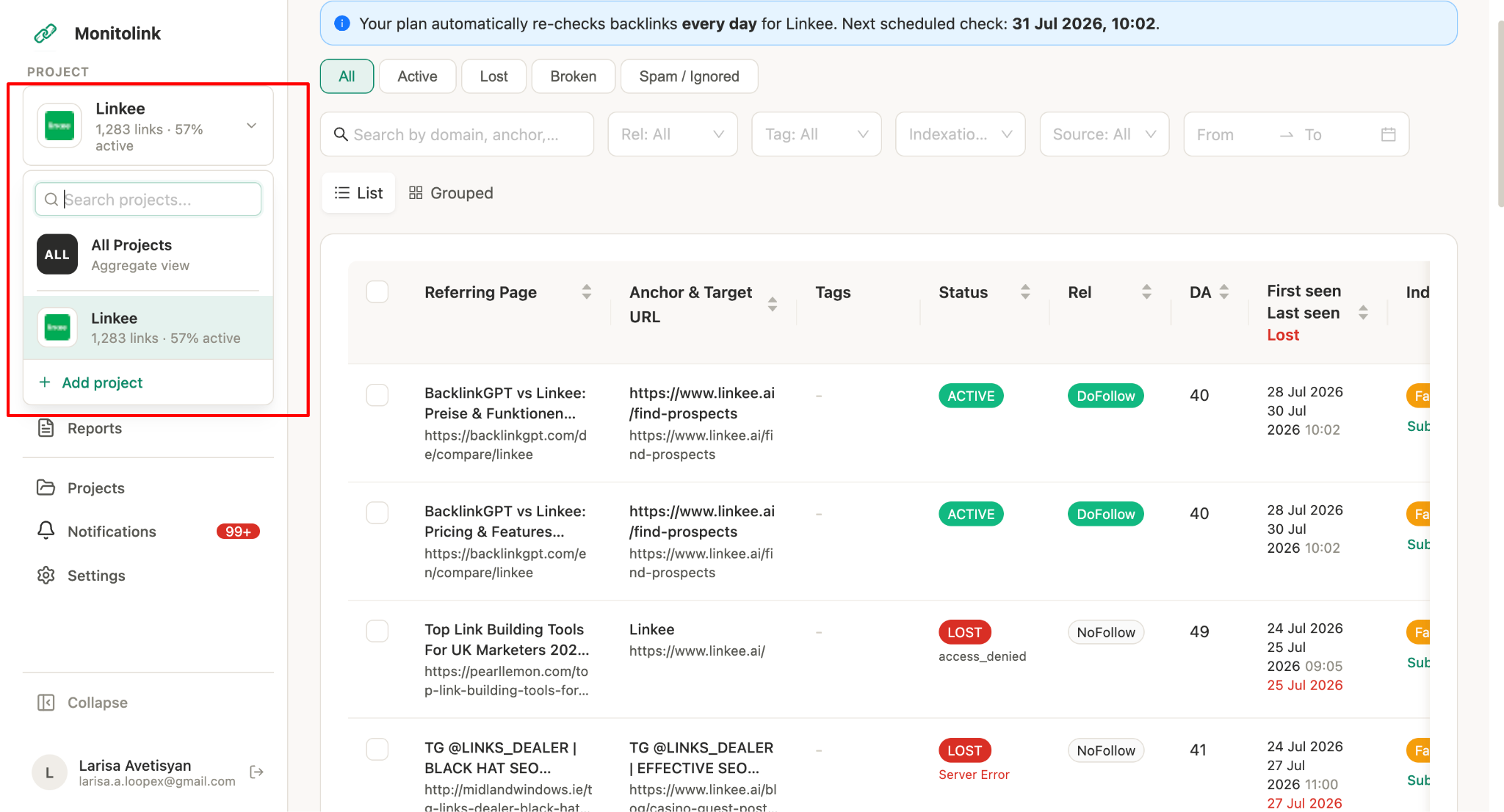
By default, Monitolink is organized by client. Each client has its own dedicated project/dashboard, making it easy to upload, manage, and track all of their campaigns from a single place.
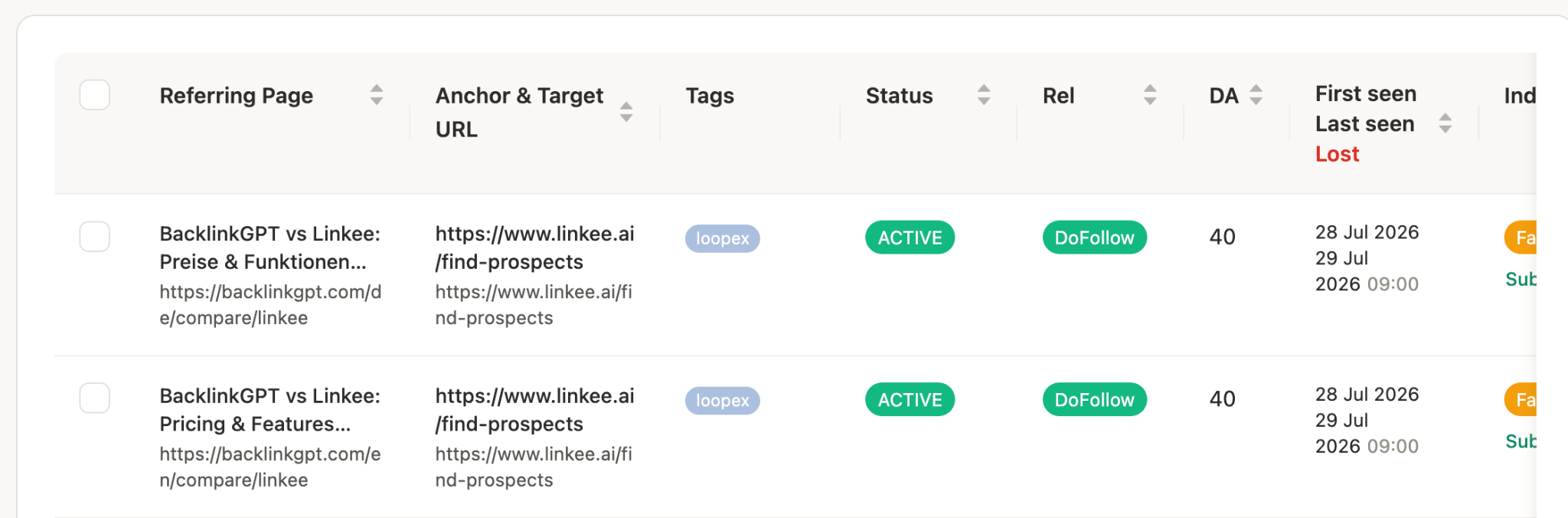
On the next level, there is campaign tracking that you can do by adding tags, naming them properly, and color-coding them for visual distinction. Now, you’ll be able to go to your client page, filter the campaign by tags, and get all the backlinks on your dashboard with relevant information.
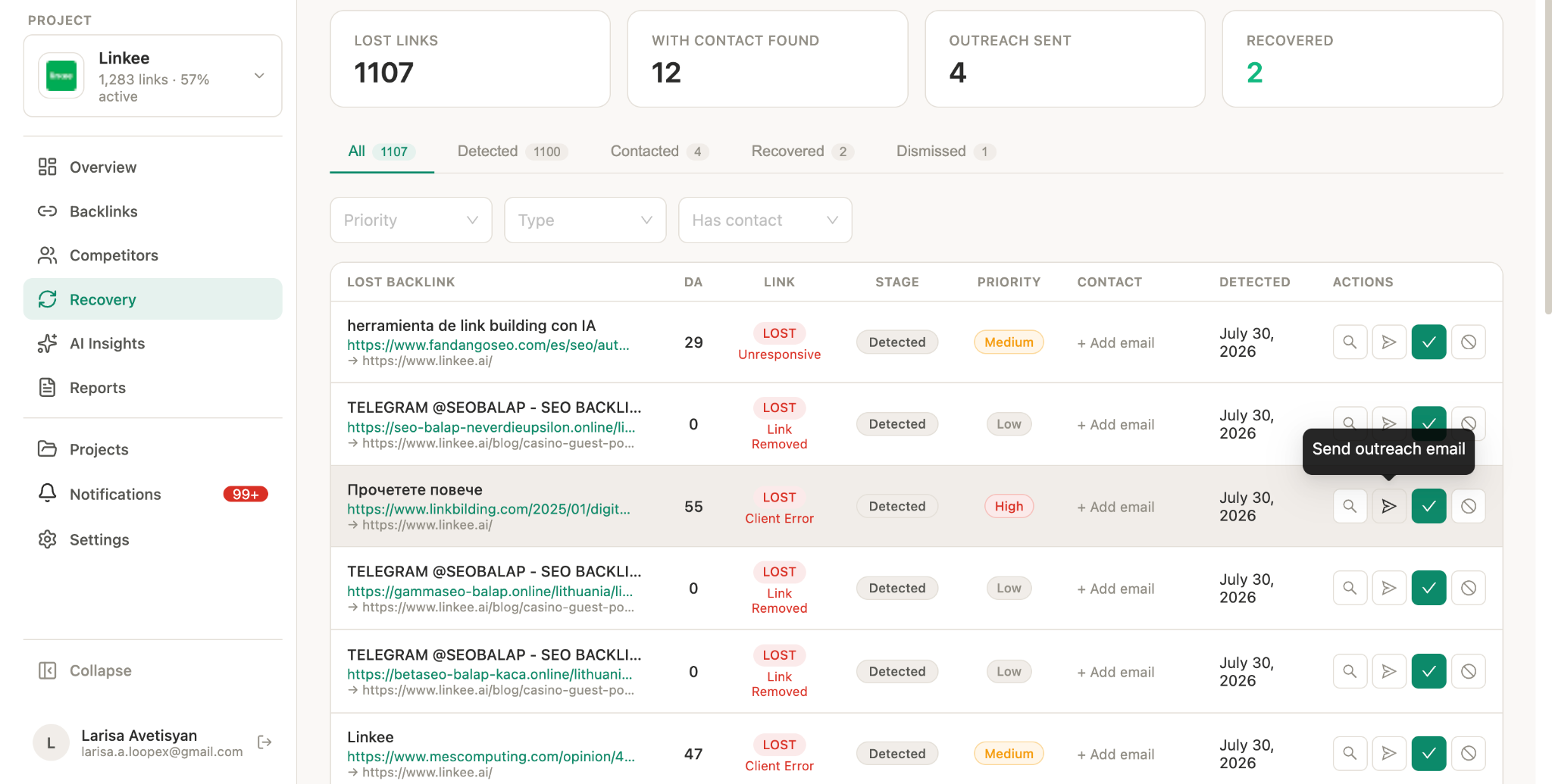
In the campaign, every link is tracked. There’s 24/7 backlink monitoring that checks link status in real time and sends same-day alerts the moment something changes, instead of waiting on the weekly refresh cycle you get from general-purpose SEO suites. For an agency managing dozens of clients, that difference between same-day and weekly detection is often the difference between recovering a lost link and never noticing it left.
When a link does drop, don't just log it as lost and move on - reach out. We built link reclamation directly into Monitolink's dashboard specifically because most lost links are recoverable if someone reaches out to the site owner quickly, and one-click outreach from the same place you monitor status removes the friction that normally means lost links just stay lost.
If you want the full playbook on this, we cover it in how to recover lost backlinks.
And just like that, you have your backlink management for agencies in one single platform, organized by client and campaign.
Managing Link Partnerships and Vendor Exchanges
If you run guest post exchanges, niche-edit vendor relationships, or barter arrangements, you need a system for it too - separate from your client-facing link tracker.
Track, per partner: what you've given them, what they owe you, and the current balance of the relationship. This gets messy fast without a dedicated record, especially when the same vendor relationship spans multiple client campaigns. A simple partnership log with columns for partner name, links given, links received, and outstanding balance prevents the awkward conversation three months later about who owes what.
Client Backlink Reporting After Backlink Management
Organized tracking data is only half the job. The other half is turning it into something a client wants to look at. Client backlink reporting works best in two phases, and separating them prevents the most common reporting mistake: judging a campaign before the links have had time to affect rankings.
Phase 1 - Acquisition report (at campaign end): referring domains added, average DR of placements, anchor text distribution, and how actual results compare to the original campaign target.
Phase 2 - Outcome report (8-12 weeks later): keyword ranking changes for the target pages, organic traffic trends, and any commercial outcomes you can tie back to the campaign. Links typically take 4-8 weeks to be fully reflected in rankings, so pulling this data too early just creates confusion about whether the work "is working."
For the report itself, white-label formatting matters more than agencies usually admit - a client-branded PDF reads as a deliverable, a raw export reads as homework you handed them.
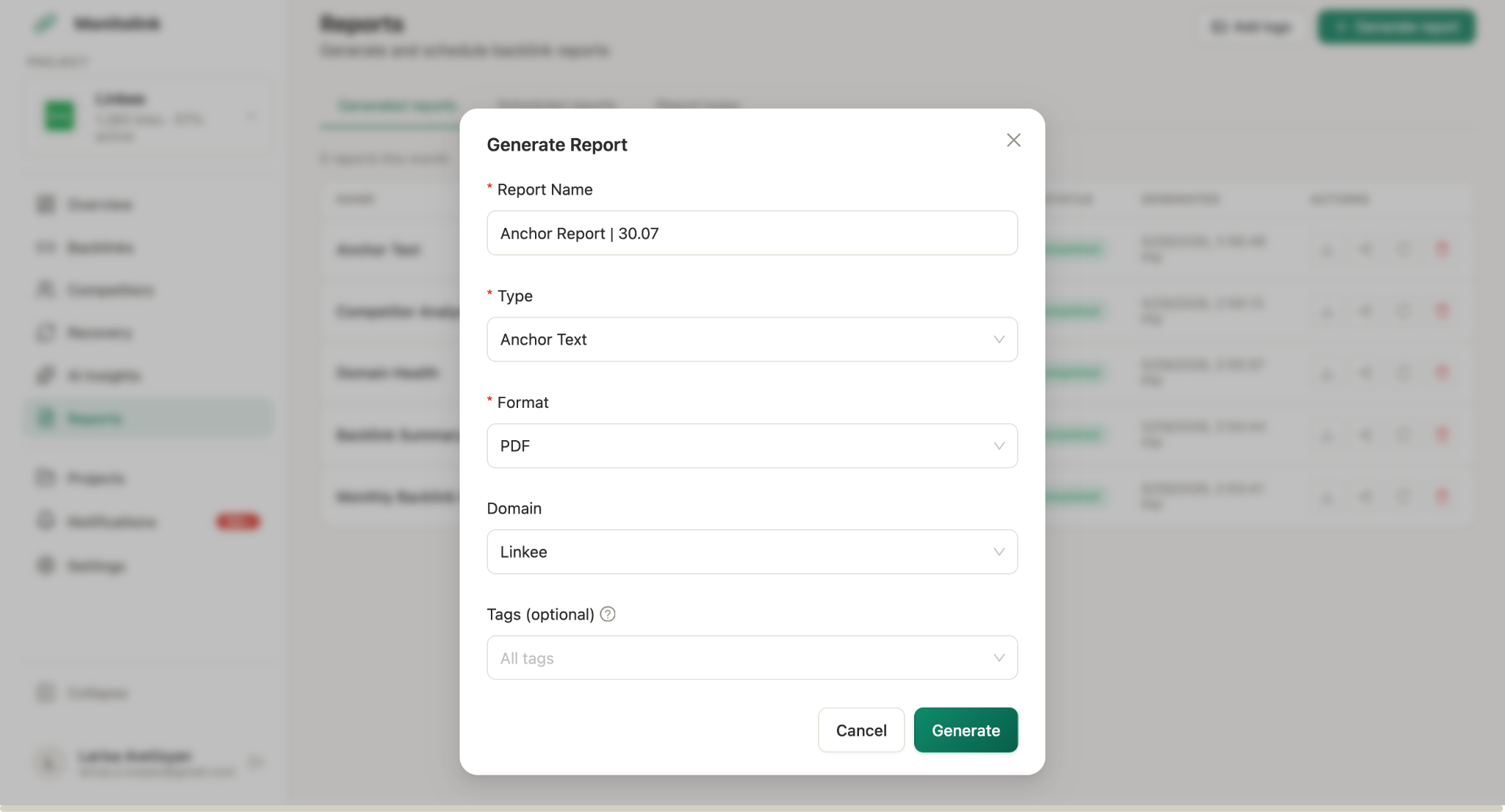
This is the use case behind Monitolink's white-label reports feature: branded PDFs showing active links, lost links, and recovered links, pulled directly from your live monitoring data instead of rebuilt by hand every reporting cycle. Teams using it have cut reporting time from a couple of hours per client down to a few minutes, because the report is a reflection of what's already tracked in the system rather than a separate deck someone builds from scratch.
We go deeper into report structure and what clients want to see in backlink reporting for clients.
Where a Dedicated Tool Fits (and When You Need One)
There's a clear point where the tracking overhead outweighs the switching cost, usually somewhere around 3-5 active clients with concurrent campaigns.
At that point, you're generally choosing between three categories of tool:
Most agencies end up running a combination - a research tool for prospecting, an outreach tool for sending pitches, and a monitoring layer for everything after a link goes live.
Monitolink’s backlink monitoring tool covers the last layer. It's built specifically around the client > campaign structure this guide describes, with bulk CSV import so you're not re-entering link data you've already gathered elsewhere, and advanced filtering by client, campaign, DA, anchor text, and status so you can work with the structure instead of just storing it.
If competitor research is part of your prospecting process, backlink gap analysis feature identifies domains linking to competitors but not to your client - a fast way to build a warm prospect list instead of cold outreach from scratch. We've also written a practical walkthrough of the method itself in how to do a backlink gap analysis and a broader look at competitor backlink analysis if you want to build that into your standard client onboarding.
You can start a 14-day free trial (no credit card needed) if you want to test the client/campaign structure described here against your own accounts before committing to a rebuild of your tracking process.